


Toyota Dashboard Symbols and Meanings: The Complete Guide

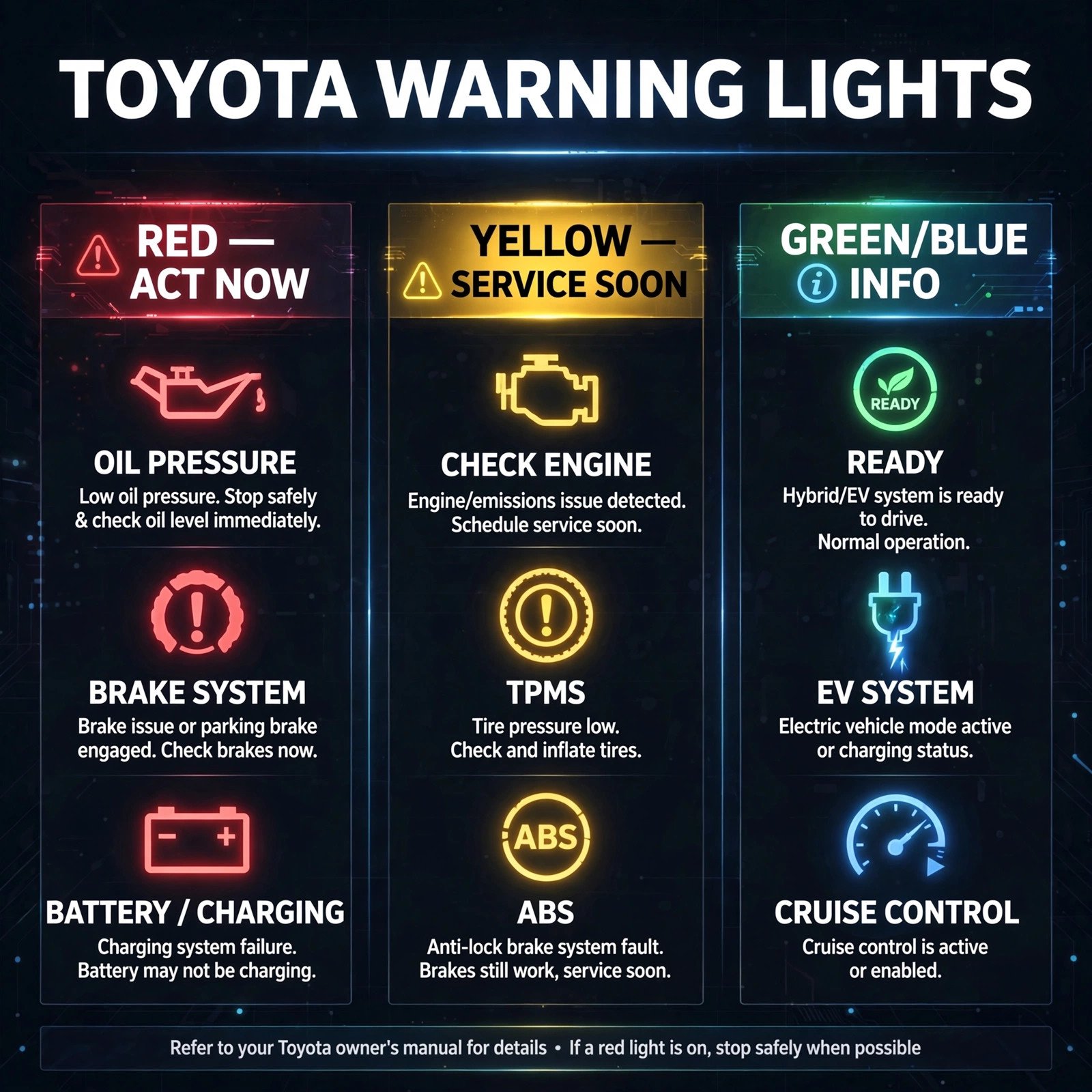
If you’re searching for Toyota dashboard symbols and meanings, a light just appeared on your dash — and you’re wondering whether to pull over or keep driving. Indeed, that’s the right question. Toyota dashboards use a color-coded system where the color tells you the urgency before you even identify the symbol: red means stop, yellow means schedule service, green and blue mean information.
This guide covers every major Toyota dashboard symbol and meaning: the red warning lights that demand immediate action, the yellow lights that mean “service soon,” Toyota Safety Sense indicators (PCS, LDA, DRCC, AHB), hybrid-specific lights, the information lights, a quick-reference chart, and exactly what to do when any light comes on — including the crucial difference between steady and flashing.
Is that light red or yellow? Steady or flashing? Did it appear while driving or at startup? By the end of this guide, you’ll answer all three in seconds — and know exactly what to do next.
Toyota Dashboard Symbols and Meanings: The Color System
Before individual symbols, learn Toyota’s color language. It answers “how urgent?” in a glance:
- Red — stop safely and address immediately. Engine damage, brake failure, or safety-system faults live here.
- Yellow/amber — caution. The vehicle needs attention soon; you can usually drive to a service appointment, but don’t ignore it.
- Green — a system is on and working (cruise control, turn signals, headlights).
- Blue — information, most commonly high beams.
One more universal rule: as a result, a flashing light is always more urgent than a steady one. A steady check-engine light means “schedule a visit.” A flashing check-engine light means “engine misfire — pull over now.”
Toyota’s own service guides, like this Toyota error lights reference from Orem Toyota, confirm the same color hierarchy — red first, always.
Red Warning Lights: Act Immediately
These are the lights you never drive past. If one appears while driving, pull over safely.
Engine and Oil
Check engine (flashing) — engine outline, flashing. In other words, this means an active engine misfire that can destroy the catalytic converter. Therefore, pull over, turn off the engine, and call for service. By contrast, a steady check-engine light is covered under yellow below.
Oil pressure warning — red oil can. Specifically, low oil pressure — not just low oil level. Consequently, the engine’s lubrication has failed; driving even a few minutes can cause severe damage. As a result, stop immediately, turn off the engine, and check the oil level. If the level is fine, the pump or sensor has failed — tow it.
Coolant temperature warning — red thermometer in liquid. In this case, the engine is overheating. First, turn off the A/C, turn the heater to max (it draws heat from the engine), and pull over. Above all, never open a hot radiator cap.
Brakes and Airbag
Brake system warning — red exclamation mark in a circle, or the word BRAKE. This means low brake fluid, a brake system fault, or the parking brake engaged. If the parking brake is off and the light stays on, do not drive — your stopping power is compromised.
Airbag (SRS) warning — seated person with a circle. A fault in the airbag system. As a result, the airbags may not deploy in a crash. Drive cautiously to a dealer; this one can’t wait long.
Battery charge warning — red battery icon. The charging system has failed — usually the alternator. The car is running on battery alone and will die when it drains. Meanwhile, turn off everything electrical (A/C, heated seats, stereo) and drive straight to service.
Yellow Warning Lights: Schedule Service Soon
Yellow means the vehicle is safe to drive to an appointment — but make that appointment soon.
Engine and Emissions
Check engine (steady) — engine outline, steady glow. In this case, the onboard diagnostics found an issue: anything from a loose fuel cap to an emissions fault. First step: tighten the fuel cap and drive a few cycles. If it stays on, get the trouble codes read.
Maintenance required — wrench icon or “MAINT REQD.” This is Toyota’s service reminder, not a fault. An oil change or scheduled inspection is due. Your dealer, incidentally, resets it after service.
Reduced power warning — the engine has entered limp mode, limiting power to protect itself. Consequently, a component fault needs diagnosis; drive gently to service.
Tires and Traction
TPMS (tire pressure) — exclamation mark inside a horseshoe. One or more tires are underinflated. For this one, check pressures against the door-jamb sticker (not the tire sidewall) and inflate. The light should clear after driving; if it flashes then stays on, the TPMS sensor itself may be faulty.
Traction control (TRAC) off — car with wavy lines and “OFF.” You’ve disabled traction control (or it faulted). Fine for getting unstuck in snow; re-enable for normal driving.
VSC (vehicle stability control) — same car-with-wavy-lines icon flashing means the system is actively working (normal in slippery conditions). However, steady means a fault — service soon.
ABS and Steering
ABS warning — “ABS” in a circle. The anti-lock system has a fault; regular brakes still work, but wheels may lock in hard braking. In short, service soon and drive conservatively.
Power steering warning — steering wheel with exclamation mark. As a result, electric power steering fault — steering gets heavy. Common after battery issues; if it persists, service is needed.
Transmission temperature — thermometer in a gear. Here, the transmission is running hot. Therefore, stop, let it cool, and check for leaks. More often than not, towing in heat is the usual cause.
Toyota Safety Sense Indicators
Toyota’s driver-assistance suite has its own symbols. These are features working — or telling you they can’t.
PCS and LDA
PCS (pre-collision system) — car with starburst. For example, flashing means the system is warning of a possible collision — brake! In contrast, steady with “OFF” means you disabled it. A fault warning means the radar sensor may be dirty or blocked (snow, mud, stickers on the emblem).
LDA (lane departure alert) — car drifting over lane lines. Green means active and tracking lanes; yellow means it’s off or can’t see the lines (faded paint, heavy rain). It steers gently or beeps — it doesn’t drive for you.
DRCC and AHB
DRCC (dynamic radar cruise control) — speedometer with a car ahead. Here, green means cruise is maintaining your set speed and following distance. If the car ahead slows, yours slows too — but keep your foot ready.
AHB (automatic high beams) — headlight with “AUTO.” The car switches between high and low beams automatically. Blue high-beam indicator appears when highs are actually on.
BSM and RCTA
BSM (blind spot monitor) — car with radar waves in the side mirror. Lights up when a vehicle is in your blind spot. If the mirror indicator stays on constantly, the sensor may be dirty.
RCTA (rear cross-traffic alert) — sounds and flashes when reversing if cross traffic approaches. It’s part of the BSM system; similarly, same sensors, same dirt vulnerability.
A pattern worth knowing: in fact, most Safety Sense “faults” are just dirty sensors. Therefore, before booking service, clean the front emblem (radar) and rear bumper corners (BSM sensors).
Green and Blue: Information Lights
These mean systems are on and working normally. In other words, all is well. No action needed.
Hybrid and EV Indicators
READY — the hybrid system is on and the car is ready to drive. In a hybrid, “READY” replaces the sensation of an idling engine — the car may be silent and still be on. As a rule, always check for READY before assuming the car is off.
EV mode — the car is running on electric power only. This is normal in slow driving; meanwhile, the engine restarts as needed.
Hybrid system warning — yellow car with exclamation mark. A fault in the hybrid system; the car may still drive but needs dealer diagnosis soon.
Cruise, Lighting, and Comfort
Cruise control set — green speedometer; your set speed is active.
Turn signals / hazards — green arrows; flashing fast means a bulb is out.
Headlights / fog lights — green indicators; blue means high beams are on.
Eco mode — green “ECO”; the car is in its efficiency driving mode.
Slip indicator (flashing) — the stability system is actively working. Indeed, this is normal operation in slippery conditions, not a fault.
Toyota Dashboard Symbols and Meanings: Quick Chart
| Symbol | Color | Meaning | Action |
|---|---|---|---|
| Engine outline (flashing) | Red | Engine misfire | Pull over now |
| Oil can | Red | Low oil pressure | Stop engine now |
| Thermometer | Red | Overheating | Pull over, cool down |
| (!) in circle / BRAKE | Red | Brake fault | Do not drive |
| Battery | Red | Charging failure | Drive to service, electrics off |
| Airbag person | Red | SRS fault | Service soon |
| Engine outline (steady) | Yellow | Emissions/engine fault | Check fuel cap, then service |
| Wrench / MAINT REQD | Yellow | Service due | Schedule maintenance |
| (!) in horseshoe | Yellow | Low tire pressure | Check and inflate tires |
| ABS in circle | Yellow | ABS fault | Drive carefully, service soon |
| Car + wavy lines | Yellow | Traction/stability | Re-enable or service |
| Steering wheel + ! | Yellow | Power steering fault | Service soon |
| PCS / LDA / DRCC | Green/Yellow | Safety Sense status | Clean sensors if faulted |
| READY | Green | Hybrid ready to drive | Normal — car is on |
| EV mode | Green | Electric driving | Normal |
| High beams | Blue | High beams on | Normal |
What to Do When a Light Comes On
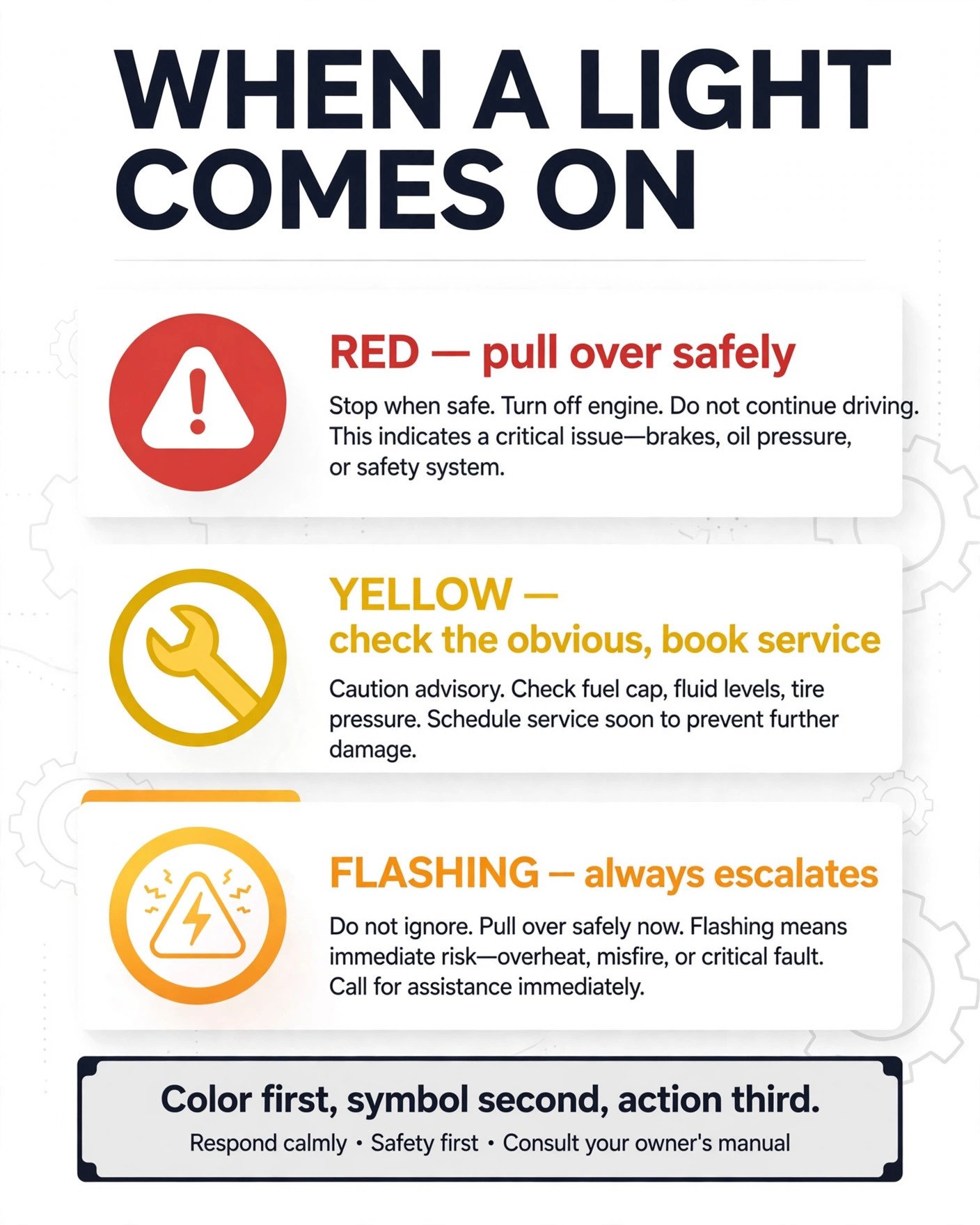
A simple decision tree for any Toyota dashboard light:
If It’s Red
- Above all, stay calm. In other words, red means urgency, not instant catastrophe — you have time to pull over safely.
- First, pull over safely. Signal, slow gradually, stop on the shoulder or a parking lot.
- Next, read the symbol. Oil can, thermometer, brake, battery — this guide’s red section tells you what each means.
- However, don’t restart and hope. For oil pressure and overheating, for instance, restarting can turn a repair into an engine replacement.
- Finally, call for help. Roadside assistance or a tow is cheaper than the damage driving causes.
If It’s Yellow
- Note when it appeared. At startup (then cleared)? While driving? After fueling? After all, context helps the technician.
- First, check the obvious. Fuel cap tight? Tire pressures correct? Sensors clean?
- Drive normally but book service. In other words, yellow is “soon,” not “someday” — within days, not months.
- Meanwhile, watch for changes. Yellow turning red, or starting to flash, upgrades the urgency immediately.
If It’s Flashing
Flashing always escalates. For example, a flashing check-engine light is a red-level event. By contrast, a flashing traction light during a skid is normal operation. In short, the rule: flashing + red/yellow = pull over; flashing + green = system working.
FAQs
What does the wrench light mean on a Toyota? It’s the maintenance reminder — scheduled service (usually an oil change) is due. First of all, it’s not a fault. Your dealer resets it after the service.
Why is my Toyota’s check engine light on but the car drives fine? Common causes are a loose fuel cap or an emissions sensor fault. Tighten the cap and drive a few days; if the light persists, have the codes read — “drives fine” doesn’t mean “nothing wrong.”
What does the car with wavy lines mean? That’s traction/stability control. Flashing while driving on slippery roads means it’s working (normal). Steady means it’s off or faulted — press the button to re-enable, or service if it won’t clear.
Can I drive with the TPMS light on? Yes, cautiously — check your tire pressures first. Driving long distances on a significantly underinflated tire risks a blowout. Inflate to the door-jamb specification.
More Questions, Answered
What does READY mean on a Toyota hybrid? The hybrid system is on and ready to drive — the equivalent of an idling engine, except silent. Never assume a silent hybrid is off; always check for READY and power down properly.
Why do my Toyota Safety Sense warnings keep appearing? Nine times out of ten, dirty sensors. Clean the front Toyota emblem (radar), the windshield around the camera, and the rear bumper corners (blind-spot sensors) before assuming a fault.
What’s the difference between the brake warning and ABS light? The red brake warning (exclamation in a circle) means the base brake system has a problem — potentially no stopping power. The yellow ABS light means anti-lock is faulted but regular brakes work. Red is “don’t drive”; yellow is “service soon.”
Do dashboard symbols differ between Toyota models? Core warning lights are consistent across Toyota’s lineup. Hybrid models add READY/EV indicators, and higher trims add more Safety Sense symbols — but red means stop and yellow means caution on every Toyota.
Conclusion
So what are the essential Toyota dashboard symbols and meanings? Red means stop now — oil, overheating, brakes, battery. Yellow means service soon — check engine, tires, ABS, maintenance. Green and blue mean systems working. And flashing always escalates whatever it touches.
Therefore, the next time a light appears, don’t guess and don’t panic: read the color first, identify the symbol with this guide’s chart, and follow the red-yellow-green decision tree. Most lights are your Toyota asking for attention, not announcing disaster — and now you speak its language.
If you enjoy decoding what cars, signs, and symbols really mean, you’ll find more plain-English breakdowns like this one at Quote of Fame.